


Musora: The Music Lessons App
4.3217.00 Reviews
App Specs
- Version
- 3.1.12
- Updated On
- License
- Free
- Downloads
- 100,000+
- Developer
- Musora Media Inc.
- Categories
- Education
- Platform
- Android
Screenshots
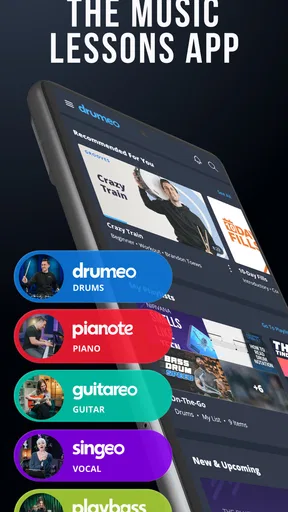

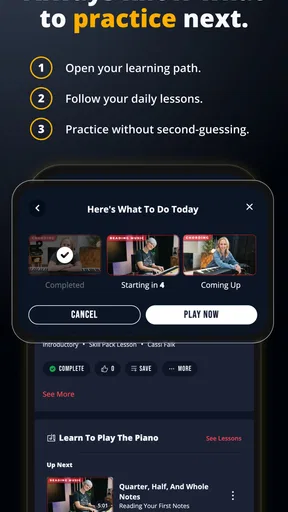
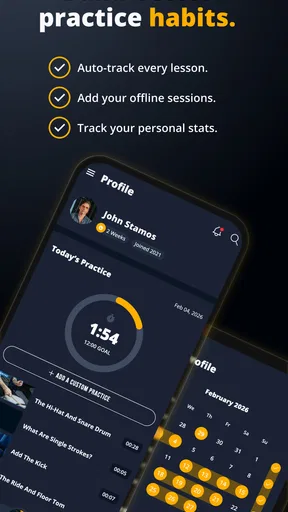
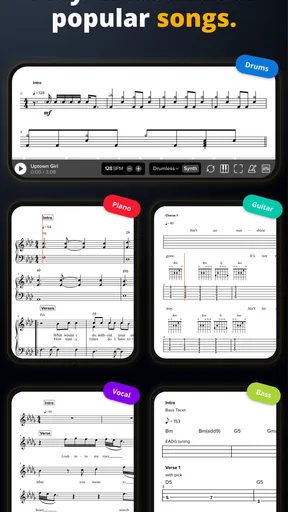
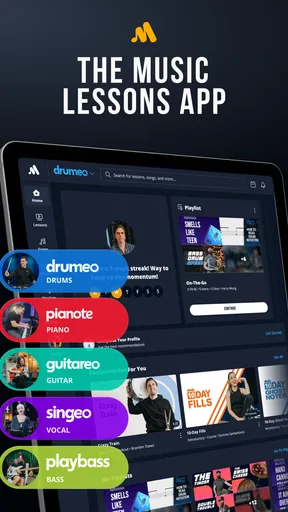

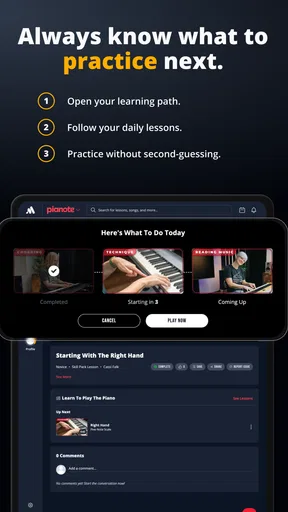
 Analysis by AppCompare
Before choosing any music-learning app, I’d ask one practical question: will it help me make steady progress with the instrument I actually want to play, or will I spend more time browsing than practicing? Musora: The Music Lessons App is an education app from Musora Media Inc. built around lessons for drums, piano, guitar, bass, and singing. That breadth makes it appealing if your interests change, but it also means you’ll get the most from it by picking one clear starting point rather than trying to tackle everything at once.
Where the first steps can feel unclear
Starting a new course can be more awkward than the playing itself. A useful first move is to decide what “progress” means for you: learning a basic rhythm, getting comfortable with chords, or building a regular singing warm-up. Then choose the matching instrument and follow one lesson far enough to see whether its pace and teaching style suit you. A broad library is useful, but it can turn into a distraction if you keep switching paths whenever something new catches your eye.
It also helps to be realistic about the difference between watching instruction and practicing. Lessons can show you what to try, but your own instrument, a little repetition, and patient listening are still essential. If you are learning quietly at home, think ahead about when and where you can make noise, especially for drums or singing. A short, repeatable practice slot is often easier to maintain than an ambitious session you keep postponing.
Simple checks before settling into a lesson
Musora is free to download, with in-app purchases ranging from $1.99 to $239.99 per item, so I would check the current purchase options before building a routine around content that may require payment. The free starting point can help you judge the teaching approach, but I would not assume every course or learning path is included at no cost. Its age rating is Everyone 10+, and the app’s current version is 3.0.4, with Android support starting at version 7.0.
If a lesson feels hard to follow, I’d first check the basics rather than assume the app is at fault: make sure the sound is audible, find a comfortable place to hold the phone, and pause when you need to try a movement yourself. For instrument practice, place the screen where you can glance at it without twisting into an uncomfortable position. If you are using the app to learn singing, listen carefully to the example before joining in; replaying a small passage can be more useful than repeatedly restarting the whole lesson.
Recovering a practice session when you lose momentum
When I get stuck, I prefer to reduce the task instead of abandoning the session. Pick one small section, slow it down if that option is available in the lesson, and repeat it until the motion or sound feels less unfamiliar. Then try it at the normal pace. If the same passage still causes trouble, stop and identify the exact snag: timing, a chord change, coordination, or simply not understanding the instruction. Naming the problem makes the next attempt more focused.
A realistic routine might be a few minutes after dinner: open the current lesson, review one idea, practice it on your instrument, then note what you want to revisit next time. That last step can save time when you return, because you do not have to remember why you stopped. I would also avoid turning every session into a test of whether you are “good” yet. Early learning is often uneven, and repeating a basic exercise can be more productive than rushing ahead to a flashy song.
Worth Reading Before You Choose

EA SPORTS FC Mobile 26 Is a Bigger Football Game, but It Takes Time

Flipboard Shows What News Apps Must Do Beyond the Feed

Switching to Android Auto Means Rethinking Your Driving Routine

Google Calendar Makes a Crowded Week Easier to Manage

Ludo King Makes the Most of the Minutes Between Plans

Baby Panda World Brings Quick Play to Modern Phones, but Its Game Library Feels Busy
When the trouble may be outside the app
Not every frustrating practice session points to a software problem. A guitar that is difficult to keep in tune, a piano with a different key feel from the one shown, background noise, or a drum setup that makes it hard to hear details can all affect how a lesson lands. Before repeating a section over and over, check the instrument and your surroundings. If the demonstration is clear but your result sounds different, the issue may be technique or setup rather than playback.
There is also a limit to what an app can provide. A recorded lesson can demonstrate an idea, but it cannot automatically replace a teacher who watches your posture, hears your timing in the room, and adjusts an explanation on the spot. If you need individual correction, are preparing for a specific performance, or keep repeating a mistake without understanding why, a local teacher or live instruction may be a better fit. I see Musora as a structured learning aid, not a guarantee of personal feedback.
Who gets the most from a multi-instrument library
The format makes particular sense for curious beginners, returning players who want a guided refresher, and households where different people play different instruments. It can also suit someone who wants to compare a few musical directions before committing to one. The trade-off is focus: if you already know you want highly specialized instruction for one advanced technique, a dedicated course or a teacher focused on that instrument may offer a more direct route.
Compared with scattered free videos, a lesson-based app can make it easier to follow a sequence instead of piecing together unrelated advice. The trade-off is that a preset path may not match every learner’s goals, and a video lesson cannot correct your hands in real time. Compared with private lessons, Musora gives you a self-directed way to study, while a human teacher can respond to your specific playing. I’d choose based on the kind of help I need, not on the assumption that one format is universally better.
Get to Know Your Musical Self
First things first, Musora is all about helping you discover your musical identity. The app kicks off with a quick quiz to gauge your skill level and musical interests. It’s like your favorite teacher who knows exactly what you need without you having to say much. Once you’ve completed this, it curates a personalized learning path just for you. I found this super helpful because there’s no one-size-fits-all in music, right?
Lessons That Hit the Right Note
Now, let’s dive into the heart of the app—the lessons themselves. The library is vast with lessons on guitar, piano, drums, and even vocals! Each lesson is broken down into bite-sized segments, which makes it easy to digest and not overwhelming at all. Plus, they’ve got pro musicians who are not only skilled but also pretty relatable. Trust me, it feels like you’re jamming with a buddy rather than being lectured by a maestro.
What I love most is the interactive nature of the lessons. You can slow down the tempo or loop sections until you get it right. And the practice tools? Absolute lifesavers! They help you hone your skills efficiently. I found myself improving faster than I expected, and that's saying something!
Community Vibes and Support
Another cool aspect of Musora is its community feature. It’s like a social network for musicians where you can share progress, ask questions, and even collaborate on projects. I’ve met fellow learners who have shared tips and tricks that you wouldn’t find in any textbook. It’s reassuring to know you’re not on this musical journey alone.
The app’s support system is top-notch too. Any queries I had were promptly addressed, and the guidance was always spot on. It's like having a support team that’s got your back 24/7.
Sleek Design and User Experience
Let’s talk about the design. The app is visually appealing without being flashy. It’s easy to navigate, and everything is where you’d expect it to be. From the dashboard to the practice toolkit, the user experience is seamless. No annoying ads popping up either, which is always a win in my book!
Worth Every Penny
Now, I know what you’re thinking—how much is this going to cost me? Well, Musora does require a subscription, but considering the quality and depth of content, it’s worth every penny. They offer a free trial, so you can dip your toes in before committing. I found the trial more than enough to get a feel for what the app has to offer.
In conclusion, Musora: The Music Lessons App is a fantastic tool for anyone looking to dive into the world of music. With its personalized approach, interactive lessons, and supportive community, it makes learning music not just effective but also a lot of fun. So, whether you want to strum, drum, or sing your heart out, give Musora a shot. You might just find yourself on stage sooner than you think!
A better way to judge whether it fits
Musora has an average rating of 4.5 from around 1,900 ratings, alongside 197 written reviews, and it has passed 100,000 installs. Those figures suggest that plenty of people have tried it, but they do not tell me whether its teaching style will click for you. I’d judge it by a more personal test: can you understand the instructor, find a lesson that matches your current ability, and leave each session with one concrete thing to practice?
The app is free to start, which lowers the barrier to trying it, but the available in-app purchases span a wide range. That makes it worth checking the specific plan or item before committing, rather than treating “free” as a promise that a full course is included. I would also consider how often you will realistically practice. If you only want occasional tips, a paid learning path may be more than you need; if you value an organized sequence and intend to return regularly, it may make more sense.
Small habits that make lessons more useful
One practical advantage of a lesson you can replay is that you can separate listening from playing. On the first pass, watch or listen without trying to keep up. On the next, focus on one instruction, then pause and try it. This is especially helpful when a demonstration combines several movements: copying everything at once can hide which part is causing trouble. A slower passage can help clarify timing, but I would return to the original pace once the movement feels secure so that practice does not become limited to an artificially slow version.
For a multi-instrument app, keeping a single “main instrument” for a few weeks is another useful safeguard against scattered progress. You can still explore the other lesson areas, but giving most of your practice time to one instrument makes it easier to notice change. If you share a phone or tablet with another learner, agree on whose lesson is open before starting; otherwise, the convenience of a shared screen can turn into confusion about which path to resume.
Where I would draw the line
I would skip Musora if I wanted a fully private teacher, formal assessment, or immediate correction of my playing. I’d also look elsewhere if I only needed one isolated answer, such as how to fix a single passage, because a focused tutorial or a brief lesson with an instructor may be quicker. On the other hand, someone who wants a guided place to begin across drums, piano, guitar, bass, or singing may appreciate having those choices gathered in one education app.
Released on November 8, 2019, Musora has continued to the current version 3.0.4. For me, the more important question is whether the present lesson experience helps build a practice habit, not how long the app has existed. It is best treated as a companion to regular playing: useful for structure and demonstrations, but dependent on your own time, instrument, and willingness to repeat difficult sections.
My practical verdict
I’d recommend Musora to a beginner who wants a guided starting point, a returning musician who would benefit from a nudge back into practice, or a curious player who wants to explore more than one instrument. I would not choose it as a substitute for tailored, live feedback when precision or personal correction is the priority. That distinction is the key to setting expectations: the app can make learning feel organized and approachable, while the actual progress comes from applying the lesson away from the screen.
My best advice is to try a short, focused session before deciding whether to continue. Pick one instrument, follow one lesson, and see whether you can explain what you learned in your own words before closing the app. If you can, you have a useful next step. If you mostly found yourself browsing, or the teaching format did not suit you, a different course style or an in-person teacher may be a better match.
Pros
- Comprehensive library of music lessons.
- Engaging tutorials with top musicians.
- User-friendly interface for easy navigation.
- Offline access to downloaded lessons.
- Regularly updated content library.
Cons
- Subscription required for full access.
- Limited free content available.
- No personalized lesson plans.
- High data usage for video streaming.
- Interface can be slow on older devices.
FAQs for Musora: The Music Lessons App
What is Musora: The Music Lessons App?
Musora is an educational app designed to provide comprehensive music lessons for various instruments, including guitar, piano, drums, and voice. It offers a wide range of video tutorials, practice tools, and community support to help users of all skill levels improve their musical abilities.
Is Musora suitable for beginners?
Yes, Musora is ideal for beginners. The app offers structured lesson plans and step-by-step guidance to help new musicians build a solid foundation. With easy-to-follow tutorials and beginner-friendly content, users can learn at their own pace and gradually advance to more complex techniques.
What devices can I use Musora on?
Musora is available on both Android and iOS devices, making it accessible to a wide range of users. Whether you have a smartphone or tablet, you can download the app from the Google Play Store or Apple App Store and access its features on the go.
Does Musora require any additional equipment?
While Musora provides the lessons and guidance, you will need your own instrument to practice along with the tutorials. Whether it's a guitar, piano, drums, or microphone for singing, having the appropriate equipment will enhance your learning experience and allow you to apply what you learn.
Is there a community aspect to Musora?
Yes, Musora includes a vibrant community feature where users can connect with fellow musicians. You can participate in forums, share your progress, and seek advice from other learners and instructors. This community support can be invaluable for motivation and improving your skills.


